Your data is yours — never used to train AI or large language models.
The AI-native construction & real-estate OS
T Meet Tara — your AI co-pilot
An AI co-pilot, built into every project.
Tara takes the busywork off your plate — drafting RFIs and reports, building the modules you ask for, and keeping budgets, accounting, and the field in sync — so your team runs more projects without dropping the ball. One AI-native platform that replaces your construction PM, your books, and four other tools — live the same afternoon you sign up. No implementation, no consultants.
Your data is yours. Never used to train AI or LLMs.
app.ventaara.com
Trusted by builders, owners, and developers
RiversideSummit BuildAtlas DevKeystoneMeridian
AI-native, not AI-retrofitted
An AI that does the busywork, so you can run the job.
The incumbents are bolting a chatbot onto decade-old software. Ventaara was built around AI from the first line — Tara takes the grunt work off your plate and keeps you in control, so your team gets more done without adding headcount.
Tara, your AI project manager
Ask in plain language. Tara drafts RFIs and submittals, logs action items, updates budgets, writes meeting minutes, and reads your drawings and receipts — then confirms with you before anything is saved.
AI in your email
Email a receipt and an expense report appears. Forward drawings and they're named, filed and versioned on the right project. Email Tara a question like a teammate — she answers with your project data.
Switch in an afternoon
Bring your spreadsheets and exports — AI import maps your columns and loads your projects for you. No 3-to-6-month implementation, no consultants, no training week. Start free and be working today.
One platform, lead to closeout
The estimate becomes the budget. The budget becomes the pay app. The pay app becomes the books.
Every phase hands its data to the next — from the first lead to the finished asset — so nothing gets re-keyed and nothing falls between tools that were never built to connect.
Lead→Estimate→Build→Control→Bill→Books→Operate
Your stack today
Construction PMRFIs, submittals & field
SpreadsheetsBudgets & accounting
Bookkeeping softwareInvoicing & company finances
E-signature toolSign & send documents
Cloud storageFile storage & sharing
Unify
Ventaara.ai
Everything, one login
✓ Construction management & field
✓ Budgets, accounting & invoicing
✓ E-signatures & documents
✓ File storage & sharing
✓ AI assistant built in
Customization without consultants
Make it yours — without a services engagement.
On the legacy platforms, "custom" means a scoping call, a consultant and a change order. On Ventaara it means telling Tara what you need, or clicking it together yourself.
AI module builder
Need a tracker the platform doesn't ship with? Tell Tara what you track and she builds the module, table and workflow — linked to your real project records, live in minutes.
Your views, your KPIs
Saved views, spreadsheet-style filtering and per-user KPI cards on every page — each person shapes the platform around how they actually work, no admin ticket required.
Client dashboards & branded output
Give each owner or lender a live, scoped dashboard instead of a monthly PDF — and put your logo on reports, e-sign packets and the login page itself.
Implementation
3–6 months
→ One afternoon
Access
5 logins
→ 1 platform
Partner seats
Paid per seat
→ Free, unlimited
One flat price. Unlimited users.
Never count seats again.
Every plan includes unlimited users and unlimited project partners — invite your whole team, the owner and thirty subs without watching a meter. Pick the plan that fits how you build.
Unlimited project partners is a guarantee, not a loophole. Owners, architects, subs, vendors and inspectors join your projects free on every plan — by design.
Your data stays yours
Every company owns its records. Projects share only what they should.
Legacy platforms put the whole project inside one company's account — everyone else works as a guest in someone else's system. Ventaara is multi-company by design: each firm keeps its own workspace, and project partners see exactly their slice.
Partners see their scope — nothing else
A GC on your project sees pay applications, never your budget, contracts or draws. Access is scoped per project and per role, automatically — not managed by hand.
Your records outlive the project
"Save a copy" files any shared photo or document into your own account, provenance-stamped — yours forever, even if it's later unshared or the job is archived. Your closeout and dispute file builds itself as you go.
One login, every company
Work as a partner on many clients' jobs, or belong to several firms? One sign-in shows every project across all of them — and each company's data stays walled off from the rest.
Elsewhere these are add-ons, integrations or a whole separate subscription. Here they're just included.
✓ Native e-sign with verification certificates
✓ 50-state lien waiver library
✓ Lender draw packages (G702/G703)
✓ Pay applications & sub roll-ups
✓ Approval workflows & designated approvers
✓ CPM scheduling + MS Project / Primavera import
✓ Document versioning & check-in/out
✓ Live client & lender dashboards
✓ AI module builder & marketplace
✓ AI in email — receipts, docs & questions
✓ Open API, webhooks & MCP
✓ Two-factor auth & granular permissions
Run every project from one place.
Replace your entire construction and real-estate stack with one login, one bill, and an AI assistant that does the busywork.
Your data is never used to train AI or LLMs.
Product
One Core OS. Workspaces when you need them.
Every plan starts with the full Core Construction OS — everything you need to run a project. As your company grows, you add specialized workspaces on top. And the features legacy platforms sell as add-ons? Just part of the product.
Included in every plan
Core — everything you need to run a project
Project ManagementProjects, companies, contacts, calendar, tasks, meeting notes
DocumentsDrawings, specs, docs, photos, files — with versioning
CommunicationChat, activity feed, notifications
FieldField reports, punch lists, RFIs, submittals
AITara, search, drafting, Q&A
Workspaces
Add the workspaces that match how you work.
Core comes with one workspace of your choice, Builder with four, Business with all of them — so the platform grows with the company instead of ahead of it.
Preconstruction
Winning work, building projects.
Estimating
Bid management & analysis
Procurement & buyout soon
Pay applications
Resource planning
Project Controls
See exactly how the project is doing.
Schedule analysis & CPM
Earned value & forecasting
Cash flow
Delay analysis & Monte Carlo soon
Risk register soon
Executive
For principals and the clients they answer to.
Portfolio dashboard & KPIs
Company financials
Utilization
Revenue forecasting
Operations
Running the company behind the projects.
Timesheets & time cards
Safety & quality
Equipment & fleet soon
Warranty soon
Development
For owners, developers and asset managers.
Capital planning
Investor reporting
Due diligence & entitlements
Leasing & asset tracking
Property Management
The building after the build.
Units & leases
Resident & owner portals
Maintenance & work orders
Owner statements
CRM
Everything before the project exists.
Leads & opportunities
Proposal tracking
Client relationships
Marketing
Financials
Your company's money, end to end.
Billing
Books
Expense reporting
Taxes soon
Which plan fits?
Core $149/mo adds one workspace, Builder $349/mo adds four, Business $799/mo unlocks all of them. See pricing →
Ask in plain language. Tara drafts RFIs and submittals, logs action items, updates budgets, writes meeting minutes and reads your drawings — then confirms before anything is saved.
Project Management
RFIs, submittals, meetings and action items in one connected workflow — with every decision, due date and owner tracked, so nothing slips between the cracks.
Field & Schedule
Daily logs, punch lists, inspections and a live Gantt with dependencies and baselines — the field and the schedule finally on the same page.
Project Accounting
Budgets, cost codes, invoicing, pay applications and lender draws in one ledger — plus a full-accounting Books workspace. No more spreadsheets that don't reconcile.
Documents & E-sign
Store, version, share and e-sign every project file — drawings, contracts, lien waivers and transmittals — with check-in/out and per-role access built in.
Reports & Analytics
Describe the report you want and Tara designs it — layout, charts and all — then exports a polished, branded PDF. Roll it up across every project into a portfolio view.
No-code Builder
Need a tracker the platform doesn't ship with? Tell Tara what you track and she builds the module, table and workflow — the customization big platforms gate behind enterprise tiers.
See it on your own project.
Spin up a project in minutes and let Tara turn on the right modules for how you build.
Who we serve
Built for every company on the project.
Most construction software picks one side of the table. Ventaara adapts — the same Core OS, shaped by the workspaces each company turns on. Find your company below, and the setup that fits.
General Contractors
Run the field, manage subs and get paid — daily logs, RFIs, buyout, and pay applications with lien waivers rolled up automatically. Owners and vendors join free — and your subs get a real account, not a guest login.
Core + Builder + Operations
Owner's Reps & Monitors
Oversee an entire portfolio — draw reviews, reporting cadence, obligations and schedule health — with live dashboards your clients see instead of a monthly PDF.
Core + Project Controls + Executive
Developers & Owners
From capital plan to stabilized asset — budgets, lender draws, investor reporting, entitlements and leasing tracked end to end, with every partner scoped to their slice.
Core + Development + Executive
Home Builders & Remodelers
Selections, schedules and budgets under control — estimating and CRM to keep the pipeline full, and clients kept in the loop in plain language under your brand.
Core + Builder + CRM
Subcontractors & Trades
Every client's job in one login. Work what they share for free, run your own field reports and photos privately, and keep your own copy of every record — plus bid, track scope, and submit pay apps and waivers.
Core + Builder
Homeowners & Individuals
Renovating or building? Tara explains everything in plain language and keeps your budget, documents and contractors organized — no industry experience needed.
Free plan — Core OS
On someone else's project? Partners always join free — scoped to their role, on every plan. You only need your own plan to run your own projects.
The partner experience
Invited to a project? Work with anyone. Own what's yours.
When a client runs their job on Ventaara, being their partner isn't a guest login — it's a real account with your name on it. Two companies, two vaults: your data lives in your account, theirs in theirs, and nothing ever mixes.
1
Get invited — freeJoin any client's project in one click, on every plan. You see exactly what they share: your pay apps, RFIs, drawings — never their budget or contracts.
2
One login, all your jobsEvery project you're on, across every client, in one list. Sign in and you're there — no juggling portals.
3
Run your own scope, privatelyNeed field reports or photos the host didn't share? Turn them on for yourself — private to your company, invisible to the host. The Free plan includes 2 active projects, so your first private workspaces cost nothing.
4
Keep your own records"Save a copy" files any shared photo or document into your own records, stamped with where it came from — yours forever, even if it's later unshared.
5
Hand work back cleanly"Send to host" delivers a copy into their project, attributed to your company — and they're notified. Deliberate hand-offs, the way construction works.
Everything your client shares is free for you, forever. Your own plan only starts when you run your own scope — and your first two projects are free. And it works both ways: companies that bring their partners onto Ventaara earn platform credits as those partners activate →
Find your fit.
Tell Tara what you want to accomplish and she turns on the right modules for how you work.
Pricing
Simple, flat plans. Unlimited users on every one.
No per-seat math, no surprise invoices. Every plan includes unlimited users and unlimited project partners — you pick the workspaces, credits and storage that fit how you build.
Free
$0/mo
Run your first two projects — free forever
✓ 2 active projects
✓ Unlimited users
✓ Unlimited project partners
✓ 5,000 platform credits / mo
✓ Core Construction OS
✓ Buy credit packs anytime
Core
$149/mo
For solo users to teams of 10
✓ Core + 1 workspace
✓ Unlimited projects
✓ 150,000 platform credits / mo
✓ 100 GB storage
✓ Unlimited users & partners
Most popular
Builder
$349/mo
For growing companies
✓ Core + 4 workspaces
✓ 500,000 platform credits / mo
✓ 500 GB storage
✓ Custom branding
✓ 10% discount on credit packs
✓ 3rd-party integrations
Business
$799/mo
For multi-office organizations
✓ Core + all workspaces
✓ 1,000,000 platform credits / mo
✓ 2 TB storage
✓ Custom apps
✓ 3rd-party integrations
✓ MCP with outside AI
Enterprise
Custom
For complex orgs with advanced security & support needs
✓ Everything in Business
✓ SSO
✓ Audit logs
✓ White label
✓ Dedicated support
Every plan includes unlimited users and unlimited project partners. Owners, architects, subs, vendors and inspectors join your projects free — on every tier, by design. Partners work within everything you share at no cost; their own plan only begins if they run their own private scope. How partners experience Ventaara →
Workspaces
Start with the Core OS. Add the workspaces that fit.
Every plan — including Free — ships the full Core Construction OS: everything you need to run a project. Paid plans add specialized workspaces on top, so you only grow into what your company actually uses.
Included in every plan
Core — everything you need to run a project
Project ManagementProjects, companies, contacts, calendar, tasks, meeting notes
Credits power the AI across Ventaara — Tara, generated reports, document scanning and more. Every plan includes a monthly allowance, and you can buy credit packs anytime if you run ahead of it. You can also earn credits by growing your network →
App Marketplace
Extend Ventaara with ready-made modules from the marketplace — or build your own with the no-code builder and Tara.
Network rewards
Build your network. Earn platform credits.
Construction is a team sport — every project you run on Ventaara pulls in the companies you work with. When they make it their platform too, your own plan gets bigger. Automatically, in credits, never in paperwork.
A partner goes paid
up to 100,000
When a company you brought onto Ventaara becomes a paying customer, you earn 25,000–100,000 credits — based on their plan, after their first 30 days. They start with 25,000 welcome credits of their own.
You keep working together
2,500 / month
Every paying company you actively collaborate with earns you 2,500 credits a month — for up to ten companies. No forms, no codes; the shared work itself is the claim.
Your network hits milestones
up to 2,000,000
One-time bonuses as your connected companies go paid: 50,000 credits at five companies, stepping up to 2,000,000 at one hundred.
Credits, not coupons
Rewards are paid in platform credits — they stretch what the AI can do for you and never complicate your bill. Progress is tracked for you on your dashboard. How partners join →
Monthly collaboration rewards apply to active paying partners and are capped at a share of your plan's allowance — designed to reward real work together, not referral farming.
Ready when you are.
Book a walkthrough and we'll get your team set up on the plan that fits — unlimited users on every one.
Why Ventaara
What you'd normally buy separately.
Legacy platforms sell you the base license, then bill the rest as add-ons, integrations and services. Ventaara ships it all in one flat plan — here's the side-by-side.
Capability
With Ventaara
The usual way
E-signatures
✓Native e-sign with verification certificates and QR-verifiable signature IDs
A per-seat e-signature subscription, bolted on
Lien waivers
✓Generated from the pay app — 50-state library, signed online by vendors
Word templates and chasing wet signatures
Lender draws
✓G702/G703 plus backup assembled into one lender-ready package
An afternoon of collating PDFs by hand
AI assistant
✓Tara does the work — drafts, files and creates records, confirming with you first
A chatbot add-on, priced per seat
AI in email
✓Receipts become expense reports; forwarded docs file themselves; Tara answers by reply
Manual data entry, every time
Getting started
✓AI import maps your spreadsheets — live the same afternoon
A 3–6 month paid implementation
Custom modules
✓Describe the tracker to Tara; it's built in minutes, linked to your records
A consulting engagement, or an enterprise-tier gate
Client reporting
✓Live, scoped dashboards for owners and lenders
Hand-built monthly PDF decks
Scheduling
✓CPM Gantt with dependencies, baselines and MS Project / Primavera import-export
A separate scheduling license
Project partners
✓Unlimited and free, each scoped to their role on the project
Paid collaborator seats — or emailing exports around
Approvals
✓Designated approvers and confirm-before-run gates on the records that matter
"Everyone can edit everything"
Your records on others' jobs
✓A private workspace on any client's project, plus "Save a copy" with provenance — yours even if it's unshared later
Screenshots, camera rolls and email folders
Hand-offs to the client
✓One attributed click — they're notified, you keep the original
Emailing attachments and hoping
API & MCP
✓Open API, webhooks and MCP so your own AI tools can query your data
An integration middleware subscription
No add-on tax. Every row above is part of the flat monthly plan price. See pricing →
One platform. One price. No surprises.
Start free on your first project and see the whole stack working together.
You already have an account with this email — enter your password to join.
Two-factor on? Log in normally first, then open your invite link again.
OR
This invite link is invalid, expired, or was already used. Ask the project team to send a fresh invite, or log in if you already have an account.
Current Project
No Project Selected
AI off for this project
Private workspace linked
Select a project to begin
Project Settings
ADMIN MODE
Admin
Company-wide settings — changes affect everyone
PROPERTY MANAGEMENT
Current Property
No Property Selected
← All Properties
BOOKS
Accounting & Billing
Your Books
Tenant-wide ledger
MARKETING
Marketing & Proposals
Your Brand
Firm-wide marketing
OPERATIONS
Ventaara HQ
Platform Operations
Pipeline · tenants · billing · usage
Organization›Projects››Home
Create new
Recent pages
NotificationsMark all read
No notifications
?
My Profile
All Organizations
Report a bug
⎋ Log out
ESC
T
Tara
T
Create new×
All Projects
+ Add project
Ventaara
My Profile
Log out
Project
SWITCH
Customize bottom bar
OVERVIEW
Dashboard
People
FINANCIAL
Budget
Contracts
Invoices
Scope Changes
Change Orders
Draw Requests
FIELD & DESIGN
Field Reports
RFIs
Submittals
Procurement
Drawings
BIM
Punch List
Photos
QUALITY
Action Plans
PROJECT MGMT
Schedule
Meetings
Tasks
RACI
Decisions
Workflows
Turn Tracker
Lessons Learned
Due Diligence
DOCUMENTS
Documents
Correspondence
Transmittals
Closeout
Customize Bottom Bar
Pick up to 4 shortcuts for the mobile bottom bar — the rest stay under More. Numbers show their order.
Please confirm your email to secure your account.
You're collaborating as a guest on their team — set up your own free account to experience everything Ventaara can do.
Activity
Everything that's happened on this project — filtered to what your role can see.
Suggestions from your team's feedback
Skills — your standards, taught to your agents
AGENT CATALOG0
Agent
Class
Status
Last run
Findings 30d
Enabled
CORRECTIVE ACTIONS0
Filter & sort from the column headers ↓
Loading…
Select a corrective action
Click a row to work it, verify it, or close it out
Correspondence
Letters & notices — official messages that may need a reply
Open
0
Response Required
0
Overdue
0
Closed This Month
0
CORRESPONDENCE0
Filter & sort from the column headers ↓
Loading…
Select a correspondence item
Click a row to view the thread
New Table
Fields
New Record
EQUIPMENT0
Filter & sort from the column headers ↓
Loading…
Select an asset
Click a row to see its inspection schedule and history
FINDINGS0
Filter & sort from the column headers ↓
Contract terms — what your agents enforce
Reports & owner digest — rep-approved narratives
HAZARD ANALYSIS0
Filter & sort from the column headers ↓
Loading…
Select an assessment
Click a row to see its hazards, controls and signatures
How-To & Help
Step-by-step guides for using Ventaara — search, filter, and open any guide to read it.
Guides0
Filter & sort from the column headers
Select a guide
Pick a guide from the list to read it here. Search the box to find one by title or by words inside the article.
Video walkthroughs
Open
0
Replied — read it
0
Resolved
0
Conversations0
Select a conversation
Pick one from the list to read it and reply.
Ask the Ventaara team
A person will read this and reply by email. For a quick how-to, Tara can usually answer straight away from the guides.
Add Video
Paste a normal share link — we embed it automatically.
Add Article
Use the toolbar to add headings, lists, and screenshots. Images are embedded inline.
Learn
Your firm's knowledge base — lessons, plan reviews, resources, and reference material
AI Entry
Customize Learn
Choose which knowledge cards your team sees. Changes apply to everyone in your firm.
Plan Review Comment
Notetaker
Tara auto-joins, transcribes, and files your meetings to the right project
Loading…
ORIENTATIONS0
Filter & sort from the column headers ↓
Loading…
Select an orientation
Click a row to see what they signed and when it expires
PACKAGES0
Package
Items
Signature
Required Certs
Valid
Scope
Your company account
Your company account is ready
Everything your company is already doing on
Ventaara comes with you — nothing to set up twice.
–
Teammates
–
Active projects
–
Documents
Your company is already on Ventaara
A teammate set up your company account, so there's nothing to create —
ask them to add you and you'll switch between companies from the top bar,
keeping the guest access you already have.
Set up your company account to:
Free to start. You stay connected to your partner —
switch between companies anytime from the top bar.
Billing
Build, submit, and review pay applications and invoices
Select a contract to begin
Choose a contract above to see its Schedule of Values and pay applications.
No contracts yet? Add one under the project's Contracts, then set up its Schedule of Values here.
Contract Value
$0.00
Billed to Date
$0.00
Retainage Held
$0.00
Balance to Finish
$0.00
BILLS0
No bills yet
Select an application
Click a row to view details
Procurement Log
Track long-lead materials from submittal through delivery, so nothing shows up late
Late
0
Due in 14 Days
0
In Fabrication
0
Delivered
0
PROCUREMENT LOG0
Filter & sort from the column headers ↓
Loading…
Select a scope
Click a row to see its pipeline and deadlines
Add from a template
Add a starter set of items to your checklist. Re-applying a template skips items you already have.
Due Diligence Report
AI is drafting the report…
Status tables (by category, by party, outstanding items, open issues) are generated automatically from the checklist.
Share Due Diligence
Create a read-only link. The partner sees only the items scoped below, with statuses and downloadable documents — no account needed. (To request a document, use "Request upload" on an item.)
Share this link:
Active links
Add item
Add lender / partner requirements
Once a partner is in the deal, add what they require of you. These items are tagged to that party so you can filter the checklist by them.
Upload the lender's closing-conditions letter, the equity partner's DD list, or a term sheet. AI extracts each requirement and tags it to this party.
Project Settings
Modules, navigation and billing for this project — team & access live on the People page
Modules & navigation
Turn modules On/Off, arrange them into sections (drag, rename, or use the dropdown), and set each Shown (in the nav) vs More (under “Show all modules”). Saved for everyone on this project.
Choose which workflow each record type runs on this project, and pin specific people to each step. Leave a record type on its default to inherit the company workflow.
Loading…
The compliance requirement types for this project — they feed the "+ Add requirement" picker on every contract. Blocks payment holds funding on a contract until the item is satisfied; the cadence controls how often it re-arms.
Loading…
Notification settings coming soon.
Loading…
AI Project Setup
Drop this project's documents (export a folder from Box or anywhere) and AI fills in the
project — metadata, contacts, budget, schedule, RFIs, submittals, invoices & change
orders — for you to review and apply. The files are also saved to Documents.
Resources
Every crew, person & piece of equipment across all your projects — spot double-bookings and rebalance.
No resources scheduled yet
Add a crew, person, or piece of equipment, then assign it to a project.
New resource
Assignments
Time off
Notes
Assign Resource
A linked assignment follows the task's dates when the schedule changes.
Resource Planning
People, crews, equipment & subcontractors assigned to this project — see who's on site and when.
No resources on this project yet
Assign people, crews, or equipment and see when they're on site.
Risk Register
Track project risks on a probability × impact matrix, with owners and mitigation plans
Open Risks
0
Critical (open)
0
Cost Exposure
$0
Total Logged
0
RISKS0
Filter & sort from the column headers ↓
No risks logged yet.
Low (1–3)Medium (4–7)High (8–14)Critical (15–25)
Select a risk
Click a row to view details
WHAT NEEDS ATTENTION
SITES WITH OPEN ISSUES0
Project
On site
Certs exp.
Certs due
Not inducted
Ind. expired
Tagged out
Insp. late
Insp. due
CAs late
Incidents
Days since
Issues
Scope Changes
Things that came up that may change the work or cost
Open
0
Needs Direction
0
Pricing
0
ROM Exposure (open)
$0
SCOPE CHANGES0
Filter & sort from the column headers ↓
Loading…
Select a scope change
Click a row to view details
Inbox
Tasks across every project you own, belong to, or are assigned.
Pick a conversation
Every project you're on has a team channel, or start a direct message with a colleague.
New chat
Attach a project document
Loading…
Link to a record
Type at least 2 characters to search.
WORKERS0
Filter & sort from the column headers ↓
Loading…
Select a worker
Click a row to see their tickets and site assignments
Loading workflows…
Workflows
Customizable checklists — and let AI run the repetitive jobs (task reports, lien-waiver tracking, status memos).
WORKFLOWS0
Select or create a workflow
New Workflow
Site Intelligence
Overlay site plans on satellite imagery, drop location notes, and track competitor projects across your market.
✕
Site plan
Opacity70%
Rotate0°
Scale100%
Align site plan · step 1 of 2
On the site plan below, click two recognizable points (e.g. two property corners). You'll then click the same two points on the map.
Link folder to a record
Attach this layer to a project, pursuit, or property so you can jump straight to it from the map.
Place an element on the map
Pick an RFI, punch item, or scope change, then click the map to drop a pin that links to it.
Site Map
Track progress on this project — geotagged notes & photos, progress lines, shapes, and site-plan overlays scoped to this project.
Good morning
All Projects
Every project for your company
Total Projects
0
Active
0
Total Value
—
No projects yet
Connect your agent
Give Claude, ChatGPT, or any tool of yours secure, read-only access to this data.
Access keys can only see the projects you're a member of, and you can revoke them any time.
Your new access key — copy it now, it won't be shown again
Or call the API directly
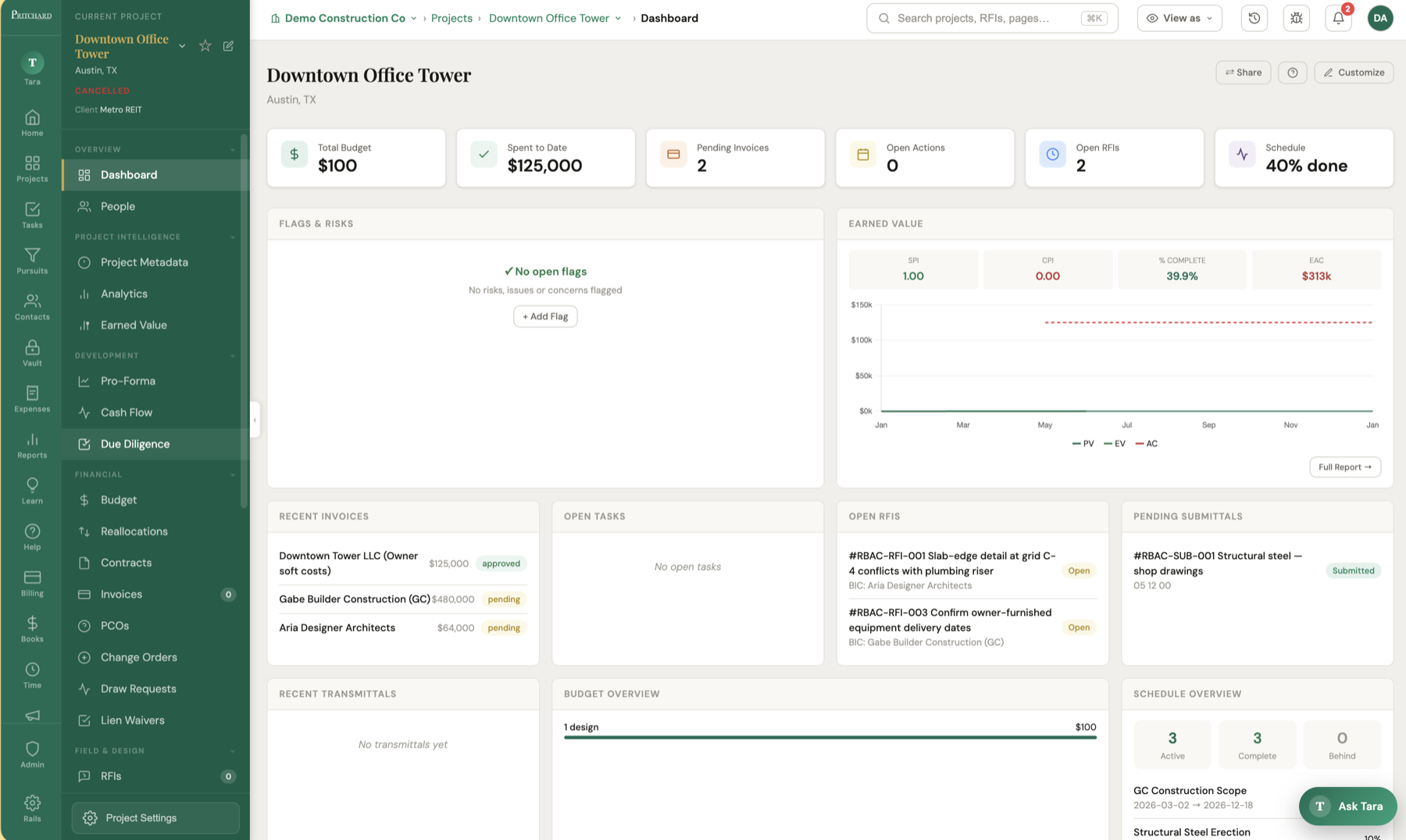
Project Dashboard
Overview of project status and activity
Drag to reorder · ⤢ resize · × hide
Hit Customize to drag, resize (⤢), or hide (×) any card — your layout sticks. ⇄ Share gives another company a live, read-only view of the cards you choose.
Total Budget
—
Spent to Date
—
Pending Invoices
—
Open Actions
—
Open RFIs
—
Schedule
—
Add Card
Add Web Embed
Embed a live camera feed or any web page as a card on this project's dashboard. Some sites block embedding — those will offer an "open in new tab" link instead.
Electronic signature
Share this project
Give another company on Ventaara a live view of the modules you pick — read-only, or let them upload back on the ones you mark Can edit. You stay the source of truth; they see it in their own portfolio. Revoke any time.
Invite vendors
Or invite one — share with (their email)
What they can see — and whether they can upload back
Which records?
Their uploads attach to this company, and they’ll only see records tied to it.
Invite a vendor
They get a restricted login that sees only this project, only what you grant below, and only their own company's records.
Vendor company (their records scope to this)
What can they do on each module?
Upload your invoice
Submit your invoice to this project. Attach a conditional lien waiver if you have one — it's tracked automatically.
Invoice file (PDF or image)
Conditional lien waiver (optional)
Financial Documents
Every billing document across the project — incoming, outgoing, and packages, in one place
DOCUMENTS0
Type
#
Party
Title
Direction
Date
Status
Amount
Loading…
Select a document
Click a row to view details
Accounts Payable
Incoming invoices and pay apps received from vendors, subs, and consultants
PAYABLE0
Filter & sort from the column headers ↓
Loading…
Select an incoming billing
Click a row to view details
Accounts Receivable
Invoices and pay applications you send to bill your client
RECEIVABLE0
Filter & sort from the column headers ↓
Loading…
Select an outgoing billing
Click a row to view details
Billing Packages
Pay applications and draw requests — the packages that roll approved costs into a funding request
PACKAGES0
Type
#
Period
Status
Gross
Retainage
Net
Loading…
Select a billing package
Click a row to view details
Payments
Payments recorded against billing documents — money in and money out
PAYMENTS0
Date
Direction
Applied To
Party
Reference
Method
Status
Amount
Loading…
Select a payment
Click a row to view details
My Invoices
Invoices on file for your company on this project.
Invoice #
Vendor
Date
Due
Amount
Status
Loading…
Invoices
Review and approve vendor invoices
Pending Review
0
Approved
0
Rejected
0
Total Approved
$0
INVOICES0
Filter & sort from the column headers ↓
No invoices yet
Select an invoice
Click a row to view details
INVOICE REVIEWS0
Date
Invoice / Contract
Period
Recommendation
Flags
Status
No saved reviews yet
Export Draw PDF
Select a draw to generate a PDF summary. You can then append individual invoice PDFs in Adobe Acrobat using Organize Pages → Insert Pages.
AI Pay Application Review
Upload the contractor's pay-app package (G702 + G703, sub backup, lien waivers, stored-material backup). AI reviews the math, signatures, retainage, SOV changes vs last month, lien waivers, and backup — cross-checked against the contract on file.
Reviewing… AI is reading the package (this can take ~20–40s).
Pay App Review
Invoice Approvers
These approvers apply to every invoice in this project. Each must sign off before an invoice is fully approved. Saving applies them to all existing invoices too.
Approvers are project members. Manage people and their approver tags on the People page; this dialog sets the signing order.
Vendor budget defaults
When you allocate a vendor's invoice to a budget line, we remember it and auto-fill that
line on their next invoice. Correct or remove any mapping here.
New Invoice
AI Invoice Scanner
Upload a PDF or image and AI will extract the details automatically.
Budget Line Items
Lines Total$0.00
Line items total does not match invoice amount
No file chosen
AI Pay App Review
Checks the math and cross-references the vendor's contract & SOV — flags anything billed that isn't in their contracted scope. The type tailors the checks (a GC pay app vs an architect's fee).
Budget
Owner's Project Budget — live cost tracking
Drag a budget line to reorder it, or drop it on a category header to move it. Starting from an estimate? AI Budget Import pulls line items from a PDF, CSV, or pasted text.
AI Budget Import
Upload a budget PDF/image (AI), a CSV (instant), or paste the numbers as text (AI). You'll review the line items — code, description, amount, category — before anything is added.
Build a nested category tree — e.g. Deferred Maintenance with Roofing and HVAC under it. A line item can attach to any category, and subtotals roll up each category's own lines plus everything nested inside it.
Import Invoices
Upload an invoice PDF/image or a batch/statement (AI reads them), a CSV (instant), or paste text (AI). Review vendor, date, amount & budget code before anything is added. Budget Code matches a budget line by its code.
Upload a CSV of budget transfers — each row moves an amount from one budget line to another. Lines are matched by their code. Leave From Code blank for new funds / contingency. A row whose To Code doesn't match a budget line is flagged and skipped.
No snapshots yet — click + Log today to record planned, earned, and actual % as a point on the curve. The curve below is built from your logged history.
Date
Planned %
Earned %
Actual % (cost)
Budget
EARNED VALUE TABLE0 months
Month
PV%
EV%
AC%
Billed%
Bill Var
PV ($)
EV ($)
AC ($)
SPI
CPI
EAC ($)
VAC ($)
Source
Loading...
Log progress snapshot
Planned % (from the schedule timeline) and actual % (from approved pay apps up to this date) are filled in automatically. Pick a past date to backfill or correct a period after more pay apps are added.
From your schedule's % complete: —— or leave blank to use it automatically.
Optional — these feed the report's Contingency and Buyout progress charts over time.
Budget Reallocations
Track budget transfers between line items
REALLOCATIONS0
Date
From
To
Amount
Description
No reallocations yet
Select a reallocation
Click a row to view details
Contracts
Manage contracts, compliance documents, and vendor agreements
Total Contracts
0
Total Value
$0
% Contracted
—
Fully Executed
0
CONTRACTS0Filter & sort from the column headers ↓
No contracts yet
Select a contract
Click a row to view details
Contract Review
New Contract
Basic Information
Compliance
Budget Line Items
No budget lines linked — click Add to allocate
Vendor upload link
Create a link the vendor can use to upload documents — no account needed.
This link requests
Loading…
Active links
Loading…
Add Compliance Requirement
Configured per project — pick one, or add a new type below.
Change Orders
Track approved changes to contract value
AI Parse reads a scanned CO form (PDF or image) or a CSV and fills in the number, amount, and dates for you — no retyping.
Pending
0
Approved Value
$0
Rejected
0
CHANGE ORDERS0
CO #
Name
Contract
Budget Line
Date
Amount
Status
Workflow
No change orders yet
Select a change order
Draw Requests
Create and manage pay applications
Total Draws
0
Total Approved
$0
Open Draws
0
DRAWS0
#
Name
Period
Total
Status
Ready
No draws yet
Select a draw
Click a row to view invoices and actions
New Draw Request
Lien Rights
Track the deadlines that preserve your lien — preliminary notice, mechanics-lien filing and bond claim, per state
Informational only — not legal advice. These deadlines are commonly-cited defaults and are not attorney-verified. They vary by claimant role, notices served and project specifics. Confirm every date with your attorney; you can override any computed deadline.
LIEN POSITIONS0
No lien positions yet
Select a lien position
Click a row to set trigger dates and track its deadlines
We'll email a secure, one-time signing link. The sub signs online — no account needed.
Fee Contract
Pulls name/email/company from the project's People. Manage contacts in the Contacts tab.
Pulls the company's address from the Contacts rail so you don't retype it. Manage companies there.
No proposal uploaded
Upload your PDF proposal to keep it side-by-side with the fee terms.
Generate Fee Invoice
RFIs
Requests for information
Already have an RFI log somewhere else? AI Upload imports the rows straight from a CSV, PDF, or photo. Export CSV downloads whatever you've filtered to.
Total
0
Open
0
In Review
0
Answered
0
Overdue
0
RFI LOG0
No RFIs yet
Select an RFI
Proposed Change Orders
Track potential changes and responsibility log
Total PCOs
0
Pending
0
Approved
0
Total Value
$0
Responsibility
—
PCO LOG0
No PCOs yet
Select a PCO
Import PCO Log
Upload a PCO log PDF or image. AI will extract all PCOs and add them to the table.
Submittals
Shop drawings, product data, and samples
Got a submittal register from the spec book or another system? AI Upload reads it from a CSV, PDF, or photo and creates each line for you.
Total
0
Pending
0
Approved
0
Revise & Resubmit
0
Overdue
0
SUBMITTAL LOG0
No submittals yet
Select a submittal
Estimating
Cost estimates & takeoff — price line items, apply markups, push to the budget
Estimates
0
Total Value
$0
Final
0
ESTIMATES0
No estimates yet
Select an estimate
Click a row to edit line items & push to budget
New Estimate
Prequalification
Vet subcontractors before bidding — financials, safety record, bonding & references
Subcontractors
0
Awaiting Review
0
Approved
0
SUBCONTRACTORS0
No subcontractors yet
Select a subcontractor
Review their qualification packet & approve
Invite Subcontractor
Specifications
The spec book, single source of truth — upload the project manual, auto-split into CSI sections, preview & search in-app, track revisions
Sections
0
Divisions
0
Linked Submittals
0
SPEC SECTIONS0
No spec sections yet
Select a spec section
Click a row to preview the pages and linked submittals
Add Spec Section
AI Import — Spec Index
Upload the table of contents / index page(s) of your spec manual (PDF or image). AI will extract the section list for you to review before importing.
Upload Spec Book
Upload the full project manual (one PDF). We split it into CSI sections with page ranges — no OCR needed for text-based PDFs. Scanned books still upload & preview but get limited search.
Uploading…
Splitting the book by CSI section. Large books can take a minute.
Div
Section #
Title
Pg start
Pg end
Edit any row, then Save. Page numbers are 1-based within the book.
Spec Book Revisions
Procurement
Bid packages, planroom & leveling — invite bidders, share drawings/specs/addenda, collect and compare proposals in one place
Plan the checks before the work happens — hold points, witness points, and the proof that counts
Active Plans
0
Points Verified
0
Holds Awaiting
0
Failed Points
0
ACTION PLANS0
Filter & sort from the column headers ↓
No action plans yet
Select an action plan
Click a row to work the verification points
New Inspection
Inspection Templates
New template
Observations
Things spotted on site that need follow-up — plus incident logging (OSHA)
Open
0
Ready for Review
0
Overdue
0
Closed This Month
0
Open Incidents
0
INCIDENTS0
Filter & sort from the column headers ↓
No incidents logged
OBSERVATIONS0
Filter & sort from the column headers ↓
No observations yet
Select an observation
Click a row to view the thread and actions
Report Incident
Log Observation
CMT Reports
Construction materials testing — upload testing PDFs and Tara files them into the right tracker and flags deficiencies
Pours Tracked
0
Complete
0
In Progress
0
Open Deficiencies
0
Files Logged
0
Loading…
Loading…
Loading…
Loading…
Loading…
Upload Testing Reports
Drop in concrete cylinder, rebar inspection, in-place density, or cylinder-pickup PDFs — as many as you like at once. Tara reads each one, routes it into the right tracker, files the PDF into Documents, and flags any deficiency.
Drag & drop PDFs here, or click to choose
Select dozens at once — or a whole folder
Lab Upload Links
Give an outside testing lab a link to drop reports straight into this project — no login, no account. They can only upload; they can't see the project or any tracker. Each report is read by Tara, routed into the right tracker, filed into Documents, and flagged for deficiencies just like your own uploads. Turn a link off anytime.
Add Pour
Add Earthwork Test
Daily Log
Structured daily field log — manpower, equipment, deliveries, weather
Total Logs
0
Workers (latest)
0
Drafts
0
DAILY LOGS0
Filter & sort from the column headers ↓
No daily logs yet
Select a day
Click a row to open that day's log
Daily Log Rollup
Send Daily Log
The day's PDF is attached automatically.
Attachments
Daily Log Sections
Pick the sections this project's daily log collects. A section holding entries stays visible even when switched off.
Field Reports
Site visit reports, monitoring, punch walks
Total Reports
0
Open Punch Items
0
Drafts
0
REPORTS0
#
Title
Type
Date
Author / Consultant
Status
No field reports yet
Select a report
Click a row to preview
New Field Report
Field Report Templates
New Template
Sections
AI Fill from Photos
Upload site photos and AI will write the field report sections based on what it observes. You can edit the content afterwards.
Analyzing photos...
AI is reviewing your photos and writing the report sections
Upload Field Report
Upload a PDF report from another consultant. AI will extract the key information automatically.
Extracted — Review before saving
Schedule
Tip: ⇥ / ⇤ on a row nests it under (or out from) the task above — nest as deep as you need; ▾/▸ collapses. Check rows for bulk % / status / vendor / delete. In the Gantt, drag a bar to move it, drag its edges to resize, or drag the dot on its right end onto another task to link them.
Give an outside company editing access: assign a Vendor to schedule lines — open a task → Vendor / company, or check rows and use Set vendor below. That vendor’s external users then see and can update only those lines. Lines with no vendor stay internal-only.
WBS
Task
Start
End
Dur
%
ES
EF
LS
LF
Float
Pred
Succ
Not Started
In Progress
Complete
Delayed/Critical
Baseline
◆Milestone
WBS
Task
Type
Start
End
Dur
%
Status
Early Start
Early Finish
Late Start
Late Finish
Float
Slip
Predecessors
Successors
Vendor
Responsible
Schedule Data — Import & Export
Bring in tasks from a spreadsheet or a PDF schedule, review them, then import.
CSV / Excel
Instant, no AI. Columns: Task Name, Type, Start, Finish, Duration, % Complete, WBS, Parent, Predecessors. Parent & Predecessors reference other rows by WBS # (e.g. 2.1FS+2).
File won't import? Paste your rows into the template — headers must be on row 1.
PDF schedule (AI)
AI reads a PDF Gantt/table. Slower; very large PDFs can time out — export to CSV if so.
MS Project / Primavera
Import a Microsoft Project .xml (MSPDI) or Primavera P6 .xer — tasks, dates, WBS hierarchy & dependencies. No AI.
Paste schedule text (AI)
Paste rows from a spreadsheet, an email, or rough notes — AI reads it and infers the tasks, dates, and durations.
Export & print
Add Task
days
Tells the dependency cascade what not to move. Deadlines (No Later Than) flag a task red if missed.
Schedule Settings
Durations count only these days; dependent dates skip the rest. Add Saturday for a 6-day push week, or check all seven for plain calendar days.
Schedule Health
Comma-separated. The report (slipping tasks + your note) is sent with your branding.
Resources & Leveling
A resource is a task's assigned Vendor or Responsible Party. Over-allocation = the same resource on overlapping tasks. Level pushes a resource's overlapping tasks so they run one after another (adds a Start-No-Earlier-Than constraint; dependent dates re-cascade).
Meetings
Agendas, minutes, and tasks
Holding a recurring meeting? Copy the last one and any open tasks carry forward automatically. Have minutes from another consultant? AI Import Minutes logs the whole meeting from a PDF or photo.
MEETINGS0
Filter & sort from the column headers ↓
No meetings yet
New Meeting
Saved
Firm
Project
Meeting #
Date
Time
Location
Meeting link (Zoom / Teams / Google Meet)
Overview
Scheduled Attendees
or
Agenda
Send Meeting
Pick who receives the agenda/minutes. This logs a transmittal and opens your email app with everyone pre-filled (attach the printed PDF).
Manage lists in the Transmittals module.
Add Agenda Item
What kind of item? A discussion item has rich-text notes; a reference item links a project table.
Tasks
Filter & sort from the column headers ↓
Switch to Board view and drag cards between columns to update status, priority, or assignee. Recurring sets up tasks that auto-create on a schedule.
ACTIONS0
No tasks yet
Subtasks
Comments
Status
Priority
Due Date
Assignees
Labels
Project
—
Created
Edit Column
New Task
Describe in plain language
Documents
Plans, specs, permits, reports, and project files
Drag files — or whole folders — straight onto the list to upload. Tick rows to move, copy, or delete in bulk, and forward documents in by email via the Email Inbox.
Folders
Item name
Status
Size
Date modified
Updated by
Tags
Filter & sort from the column headers ↓
DOCUMENTS0
Select a document
Create a Project Email Inbox
Give everyone working on this project — contractors, architects, consultants — a dedicated email address.
Any email they send — with attachments — automatically lands in your Documents tab.
AI reads and categorizes every attachment.
How it works
1. You create a unique inbox email address for this project
2. Share it with your project partners
3. They email documents and attachments to that address
4. AI reads each attachment and extracts: document type, author, company, date, version, key info
5. Documents appear in your Documents tab automatically
Project Email Address
—
Emails received
—
Awaiting review
—
Select an email
No drawings yet
Upload individual sheets or a full drawing set PDF to split automatically
Email Inbox Settings
—
Where emailed files are filed. Leave on “Unsorted (auto)” to drop them in an auto-created Unsorted folder you can sort later.
Auto-sort matching emails into a folder — and optionally create a record. e.g. subject contains “OAC” → file into Meetings and create a meeting from the minutes.
New Filing Rule
Test Email Inbox
Simulate an inbound email with an attachment to test the AI parser.
Upload Document
Drag & drop, paste (⌘V), or click to browse
Reports
Click a template to produce a report for this project — it pulls live data, opens the builder, then you export or log it to Transmittals.
Templates for this project
Pick which report templates show as click-to-run cards on this project. Author new ones in the Builder rail.
Development Report
Closeout
General closeout documents and subcontractor tracker
Closeout Package
All closeout files + a tracker PDF and an index page for easy browsing.
General Closeout Documents
Documents Flagged for Closeout
Loading...
Closeout Tracker
Add Subcontractor
Duplicate Template
Copy sub categories and required items from another project. Sub names will be blank for you to fill in.
Project Profile
Specs, classification, and portfolio details
Profile Completeness0%
Edit Options
Add, remove, or reorder options. These changes apply to all projects for your firm.
Pursuit Info
Lead tracking for this project
Contact
Pipeline
Source
Proposal
Description
Interaction Log
Proposal Templates
Capex
Capital mini-projects on this building — allocation, committed, spent
Loading…
Analytics
Metric cards tied to this project's live data
Add Metric
Controls
Pay app review · Stored material · Lien waivers
· · ·
Coming soon
Pay app review · Stored material · Lien waivers
Photos
Site photos organized by date
AI Tag labels photos by what's in them, so you can search "electrical panel" or "framing". Open any photo and use ← / → to flip through the gallery.
0 photos
0 selected
Date
Taken By
Location
Category
Field Report
Photo Details
RACI Matrix
Responsible · Accountable · Consulted · Informed
Click a cell to cycle R → A → C → I → blank. R Responsible · A Accountable · C Consulted · I Informed. Rows are default activities — rename or delete (×) any that don't apply.
Decisions
Log key project decisions with context and rationale
DECISIONS0
No decisions yet
Select a decision
Click a row to see context, rationale and impact
Time Cards
Internal hours logged to this project — labor cost & profitability
My Timesheets
Log your hours by project and submit each week for approval.
Internal Accounting
Firm P&L for this project — fee revenue vs. labor & expense cost
Build branded pursuit proposals from your firm profile, portfolio & boilerplate.
Documents
Company folders & every project's documents, together.
Log Decision
Lessons Learned
Capture insights to improve future projects
Total
0
High Impact
0
Categories
0
Published
0
LESSONS LEARNED0
No lessons logged yet
Select a lesson
Transmittals
Reports, draw packages, and documents sent to clients
Build Report assembles a branded PDF from templates, your own sections, and attached documents — cover letter, report body, and checklist files all merged into one file ready to send.
TRANSMITTALS0Filter & sort from the column headers ↓
Select a transmittal
New Transmittal / Report
People
Everyone on this project — directory, roles & access, and distribution lists
Upload file
AI Import (CSV / paste)
Scan Card / Directory
Import from another project
Import can scan a business card or a directory PDF — Tara pulls out names, emails, and phones. Group contacts into a Distribution List to email or notify them together.
PEOPLE0
Filter & sort from the column headers ↓
Name
Company
Role
Email
Phone
No contacts yet
DISTRIBUTION LISTS0
No lists yet
New expense report from receipts (0)
Line items (one per receipt)
Pending expenses (0)
Receipts emailed or texted to your intake address/number (or queued by Tara). Edit anything the AI missed, untick rows to skip, then file the rest into a report.
Nothing pending. Email or text a receipt to your intake address/number and it'll show up here.
AI Import contacts
Paste a CSV, a spreadsheet selection, an email signature, or any loose list of people. AI reads it and maps the columns — you review everything before it's added.
Review scanned contacts (0)
AI read these from the image. Edit anything, remove rows you don't want, then add them.
Import People from Another Project
Copies that project's people roster into this project.
Add Contact
Start typing a name, company, or email — or just fill the fields below.
New Distribution List
No contacts available
Contacts
Sync from Projects
Scan Card / Directory
CONTACTS0
Name
Role
Company
Location
Mobile
Office
Email
Tags
Select a contact
COMPANIES0
Company
Type
Location
EIN
W9
Tags
Select a company
Add Contact
Members of these companies will see this contact even though it's private.
Add Company
Members of these companies will still see this company even though it's private.
Pursuits
Business development pipeline
Active
0
In Proposal
0
Awarded
0
Pipeline Value
$0
Win Rate
0%
Select a pursuit
Vault
Secure credential storage. Enter your account password to continue. The vault auto-locks after a period of inactivity; an admin controls who has access in Vault Settings.
Vault
Secure company credentials and passwords
Unlocked
Total Entries
0
Categories
0
Total Credentials
0
Security · Settings
Configure
CREDENTIALS0
No vault entries yet
Select an entry
Click any row to view details
New Vault Entry
Account Info
Login Credentials
Confirm Password
Enter vault password to view sensitive details.
Vault Security Settings
Configure security requirements for accessing the vault. Changes apply to all users immediately.
Access Controls
Who can access the Vault
Admins & owners always have access. Toggle access for everyone else — users without access don't see the Vault at all. The vault unlocks with each user's own account (login) password.
Auto-Lock
minutes of inactivity
Recent Access Log
Expenses
Expense reports and reimbursements
Drop all your receipts at once with AI Report from Receipts — Tara reads each one and builds the report, one line per receipt. Or Send Receipts In by email or text from your phone, straight into your queue.
0 emailed/texted receipts waiting to be filed into a report.
How it flows: create a report & allocate it to a project → Submit → Approve. Approved reports become reimbursables you can add to a client invoice from the Billing rail, and you separately Reimburse the person. A Invoiced tag shows once a report has been billed to a client.
Total Reports
0
Pending Approval
0
Total Amount
$0
Unreimbursed
$0
EXPENSE REPORTS0
#
Title
Period
Projects
Amount
Status
No expense reports yet
Select a report
Click a row to view details
UNCATEGORIZED EXPENSES0Assign each to a report — it moves out of this list once filed
Drag receipt photos or PDFs here to add them to the queue
Date
Vendor
Description
Category
Amount
Receipt
Expense Report
No uncategorized expenses — email or text a receipt, or drag one here.
New Expense Report
Reimbursement
Report Info
Project Allocation
Expenses
Date
Category
Description
Vendor
Miles
Amount
Payment
Billable
Rcpt
Reimb.
Add Expense
AI Receipt Scanner
= $0.00
Monitoring Tracker
Every working monitoring job by month — site visits and development-report transmittals, planned vs. actual, for accountability and resource forecasting.
V site visitsR dev reports
· cell = actual / planned · click for the month's workflow
Loading…
Edit cell
Site visits
Report
OACs
Monthly cadence
The planned visits/reports applied to every month for this project (unless a specific cell overrides it).
Set reports to 0 for engagements with no monthly report (visits/OACs only).
The engagement window — outside it nothing is planned, no periods open, and the Team forecast rolls the work off. Leave blank for underway / open-ended.
Site visits
Report
OACs
Admins only — drives the Forecast view. The PCR fee books in the engagement's first month.
Unchecked: the project drops off the tracker and forecasts. Find it again with "Show untracked" in the toolbar.
Log what already happened in past months — visit and report dates, no report needed.
A report date (or ✓) marks the month done on the tracker; clearing ✓ reopens it.
New report
Pick a project and report type — we'll open the full editor on that project, where you can fill it in and send it.
Monitoring
Firm document checklist
The standard documents your monitoring engagements require. Apply it to a project from its monitoring dashboard — Pre-con items are tracked once per engagement, Monthly items get a receipt every period.
Initial Plan & Cost Review
Reports
Run a report for a project or a client portfolio, schedule recurring reports, and track what's been sent.
Describe a report — AI builds the PDF
Tell me what you want — e.g. "a full project report" or "the financial situation of this project" — and I'll design it and render a branded PDF from the project's live data.
…or build one by hand: pick what to include and export a branded PDF.
Portfolio / Client Report
One client, many projects — the highlights of each (summary, budget, schedule, open items, photos…) in a single PDF.
Single-Project Report
Pick a project, then click one of its pinned templates (or start blank) to build a branded PDF — with AI narrative drafting and a live preview.
Author and pin report templates in the Builder rail → they show as click-to-run cards on each project's Reports page.
Recurring email reports — created from the report builder's Schedule… button. A fresh PDF is rebuilt from live project data and emailed on the chosen cadence.
No scheduled reports yet — open the report builder for a project and click Schedule…
Everything logged to Transmittals across your projects. Click a row to open it on the project.
Nothing sent yet — generate a report and Log to Transmittals.
PDF Forms
Upload a PDF form (owner pay-app, lien waiver, any template), let AI help fill the fields, and export the completed PDF.
Click on the form where a field should go, then name it.
Fields
PDF Forms
Assign forms to your team or external parties, track them to submission, and file the completed PDF into this project's Documents.
Open
0
Overdue
0
Awaiting Approval
0
Approved
0
FORM SUBMISSIONS0
Filter & sort from the column headers ↓
Select a submission
Click a row to view details
Form Templates
Upload any paper-shaped PDF (safety form, pay app, lien waiver) to make it a reusable template — fillable PDFs pick up their fields automatically, flat PDFs let you place fields by clicking. Templates uploaded here are tagged to this project; company-wide ones also show. Manage all templates from the PDF Forms rail.
Portfolio / Client Report
Pick a client (or hand-pick projects), choose the sections, and export one branded PDF with the highlights of each project.
Projects
Pick a client to list its projects.
Sections — each project includes only the sections it has
Knowledge Base
Lessons learned and template library
No entries yet
Turn Tracker
Unit renovation tracking and walk sheets
Total Units
0
Complete
0
In Progress
0
Behind Schedule
0
Avg Days/Unit
—
Longest Open
—
Filter & sort from the column headers ↓
UNITS
Select a unit
Click any unit to see its dates, walk sheets & progress.
Operations
Ventaara platform operations — pipeline, tenants, billing, AR & usage.
Billing
AR invoices to owners and clients
Every project's billing in one table — issued invoices plus the predicted ones the engine expects for current and upcoming periods. Approve a predicted row to create the invoice and send it (it becomes the real row in place); Won't bill skips a project for a period. Predicted amounts include the fee plus approved reimbursable expenses.
Total Billed
$0
Awaiting Approval
0
Outstanding
$0
Collected
$0
BILLING0
Loading…
Admin
User management, firm settings, and white-label configuration
Security Flags
(0)
Changes below aren't applied until you save.
Company Identity
Shown in the nav rail, login screen, and browser tab
The name your notetaker bot uses when it joins Zoom, Teams, or Google Meet calls
No logo
PNG, SVG, or JPG Used on light backgrounds (login screen, reports)
No logo
PNG, SVG, or JPG Used on dark backgrounds (nav rail). Falls back to the light logo.
None
Square icon for the browser tab (e.g. 512×512 PNG or SVG). Use a compact mark — the wide logo squishes here. Falls back to the logo, then the icon letter.
Fallback shown when no logo or favicon is set
Legal firm name used on reports & invoices
What your firm is on a job — drives your billing view (AR / AP / draws / WIP). You can override it per project.
Office address, phone & email are managed under the Offices tab
Brand Colors
Live Preview
V
Overview
Dashboard
People
Run Your Company
Projects Page
Data highlights
Choose which summary cards appear at the top of the Projects page for everyone in your company. Uncheck Total Value if you don't want the portfolio dollar total shown. Tip: you can also hover any page's highlight cards and hit the small gear to edit them in place.
Two-Factor Authentication
Session Timeout
Sign people out after a period of inactivity
Applies to everyone in this company. Closing the browser always ends the session — this controls how long an idle session stays open before it needs a fresh sign-in.
Platform-Enforced Policy
Set by Ventaara platform administrators and shown here read-only.
AI Privacy
AI Models
Choose which AI model powers this company's AI features. Cheaper models cost fewer tokens — route lighter tasks to them to save money. Users can override their own preference.
Platform credits—
Credits power every AI feature. Your plan includes a monthly allowance; buy packs any time ($1 = 1,000 credits). AI pauses when credits run out, so you'll never get an unexpected bill.
Monthly capUSD (0 = no cap)
Network rewards
Earn credits by collaborating: invite a partner company to a project and you'll earn when they become a paying customer, keep earning monthly for every active paying connection, and unlock one-time milestones as your network grows.
Network rewards accrue on paid plans — upgrade to start earning.
Per-task model routing
Send specific tasks to a specific model. Anything left on "Company default" uses the model above.
Your own API keys (optional)
Add your own provider key to bill that provider directly and skip the platform markup. Keys are encrypted and never shown again.
Platform AI markup (Ventaara)
Multiplier on the at-cost provider token price for platform-key AI usage across all companies — what the wallet deducts and the monthly invoice bills. 4× means a company pays 4× what the tokens cost you. BYOK usage is never marked up.
×
Billed-out price per 1M tokens at this markup (input / output):
Model reliability & latency
Last 30 days by model — call volume, error/fallback rate, and response latency. Use this to spot a cheaper model that's pricing and behaving well before routing more tasks to it.
Email Delivery
Checking…
Custom Sending Domain
Branded Login Link
Privilege Sets
Define the privilege sets your company uses and what each can do. A privilege set controls which projects its members see (all projects vs only the ones they're added to), their permission level per module, and which left-nav rails they get. Assign privilege sets to people on the Users tab or in a project's People tab.
Loading…
New Privilege Set
Module permissions
None = hidden · View = read only · Edit = add & change · Manage = also delete
Left-nav rails
None hides the rail from this privilege set. Core rails (Projects, Tasks, Help) always stay on; the Admin rail stays on for admin privilege sets.
Service Types
Services you bill clients for. These appear as line items on invoices.
Payment & Invoice Footer
Import Your Existing Data
Moving from Procore, Excel, or another system? Upload your files — AI reads your columns, maps them to Ventaara fields, and shows you a preview before anything is imported.
Supported Sources
Excel / CSV
PDF Export
Procore Export
Buildertrend CSV
Sage Export
QuickBooks CSV
Import History
No imports yet — click New Import to get started
Loading...
Data Assistant
Describe a data problem in plain language — e.g. “Dak's projects don't show as his” or
“find duplicate contacts”. The assistant proposes a fix, shows you exactly what would change,
and only applies it after you confirm. It only runs vetted operations on this workspace.
Data & Account
Export a full JSON backup of your company's records (files excluded). To
delete your company account or request a data takeout with files, contact Ventaara support — account deletion isn't self-serve.
People & Access
Loading…
Everything here is tenant-wide — changes apply to all projects and users immediately. Grouped by where each setting shows up.
Project numbering— auto-fill the Project # on new projects
Tokens: {prefix}{seq}{seq:04d}{YYYY}{YY}{MM}{DD}.
{seq} pads to the width below; {seq:04d} sets its own width.
Next new project will be
—
Project dropdowns— choices users pick when creating / editing a project
Internal Status
Your firm's pipeline state — Working, Pursuit, Dead… (not shared externally)
Project Phase
Where the work actually is — Pre-Dev, Bidding, Pre-Con, Construction…
Project Type
Delivery / scope of work — Ground-Up, Renovation, Tenant Improvement…
Building / Asset Type
What kind of property — Office, Multifamily, Retail, Self-Storage…
Service Type
The role your firm plays — Owner's Rep, Construction Monitoring, Consulting…
Project Profile page— what the per-project Profile module captures
Sections, fields & layout
This drives both the Profile page and its editor. Show / hide, rename, and reorder whole sections (drag within a column, or move between columns). Expand a section (“▸ N fields”) to toggle, rename, and drag its fields — drop a field on another section to move it there. For Classification, choose which tag groups appear. Changes save automatically.
Custom fields
Track anything else — a typed field (text, number, date, dropdown, yes/no, link) under any heading. Type a new heading name to create a new section on the Profile page.
Custom tag groups
Multi-select tag groups (like Project Type / Building Type) — users pick options as chips. Use “Edit Options” to set each group's choices.
Sidebar project card— the “Current Project” box in the left rail
Built-in card fields
Pick which built-in lines show under the project name. A line only appears when the project has a value for it.
Client project list— the All-Projects columns CLIENT accounts see (and receive from the API)
Applies to every user with the Client role. Project Name is always shown.
Unchecked columns are also removed from the data the server sends them — not just hidden.
Project setup checklist— the “Project setup” progress card on each project dashboard
Choose which items show, reorder them, and rename labels. Each item still auto-completes from real project data.
Custom project fields— track anything else on a project; optionally show in Edit Project & the sidebar card
Add any field you want to track per project. Check In Edit to show it in the Edit Project form. Check On Card to show it in the left-rail project card.
Templates decide which modules a new project starts with. Built-ins are shown for reference; create your own below.
Shape the project nav per project type. New projects of an archetype start with its sections; project leads can still tweak any single project. Add, rename, reorder or remove sections, and drag modules between them.
Your company's offices. Each user picks their home office in their profile — prints and invoices use that office's address (HQ is the fallback).
Add Office
Print Preview
Powered by Ventaara
Report Header
Report Footer
Options
Create API keys so external apps (Zapier, your own tools, partner integrations) can read your
company's data over the public API at /api/v1. Keys are read-only for now and
scoped to exactly what you allow. Send the key as Authorization: Bearer <key>.
View API reference
Endpoints (GET, read-only)
GET /api/v1/me — verify a key & see its scopes
GET /api/v1/projects · GET /api/v1/projects/<id>
GET /api/v1/contacts
GET /api/v1/action-items ?project_id=<id>
GET /api/v1/rfis ?project_id=<id>
GET /api/v1/documents ?project_id=<id> (metadata only)
All list endpoints accept ?limit (max 100) & ?offset and return {data, pagination}. Example:
This is the only time the full key is shown. Store it somewhere safe; you can't see it again.
Webhooks push events to your apps in real time — instead of polling the API, you give us a URL and we
POST a signed JSON payload whenever a subscribed event happens (a project created, an RFI updated, etc.).
Each request carries an X-Vantara-Signature: sha256=… header — an HMAC of the body using your
endpoint's secret — so your receiver can verify it's really from us.
New Webhook Endpoint
QuickBooks Online
Push your Books invoices, bills, and payments into QuickBooks.
Loading…
T
Tara
Ventaara AI — Ask anything about your projects
Chats
Connected Folder
Loading…
Needs Attention
Loading…
Drop files to attach
Send Tara out
Review
Tab to accept
Delegate
New Project
Starting point
Pick a starting point — it turns on the right modules for this kind of work. You can change them later in Project Settings.
✓Using the modules from your setup.
Brings the structure; strips the live content. Pick what to copy:
Optional (off by default)
Details
Rail Library
Add sections to your sidebar. Start with what you need — add the rest whenever you want.
Marketplace
Add sidebar sections and project modules — or build your own
AI Module Builder
Describe a problem you're trying to solve. AI will design a custom module for it.
AI Recommendation
Build Custom Module
Data Import Wizard
Step 1 of 4
Plan & Usage
Your Ventaara subscription, seat counts, AI tokens, and storage
Loading...
Drawings
Drawing set management and punch pin viewer
AI Plan Review
0 selected
No drawings yet
Upload individual sheets or a full drawing set PDF to split automatically.
BIM
View IFC building models in the browser — connect virtual design & construction to the field
MODELS0
No models yet
Upload an IFC (IFC2x3 or IFC4) exported from Revit, ArchiCAD, Tekla, or any BIM tool.
Select a model to view
Its 3D geometry loads and renders right here in your browser.
Loading model…
Drag to orbit · scroll to zoom · right-drag (or Pan mode) to move · double-click a surface to focus that point
Upload BIM Model
Export an IFC (IFC2x3 or IFC4) from your BIM authoring tool. Native .rvt is not supported yet.
Punch List
Deficiencies, approvals, and resolution tracking
Bulk import punch items
Paste rows or upload a CSV — one item per line. Columns: Description, Location, Room, Trade, Priority, Assignee, Due; only Description is required. A header row is optional.
Open
0
In Review
0
Approved
0
Total
0
Critical
0
PUNCH ITEMS0
Select a punch item
Locations
Pick a location to see everything tagged to it — punch items, photos, submittals & RFIs
LOCATIONS0
Select a location
Pick a location to see everything tagged to it.
Edit Sheet Info
Revision History
Loading…
New Punch Item
Pin placed on drawing
Tap to add a photo
Approve Punch Item
⊞ Upload Drawing Set — PDF Split
Drop a drawing set PDF here
Each page becomes an individual sheet
AI has pre-filled what it could detect.
AI analyzing drawings...
Add Drawing Sheet
Builder
Create your own modules, forms, and report templates, then publish to your company.
One place for everything you publish to your company. Modules are custom data tools, Forms are mobile-friendly field inputs (site obs, punch walks), and Reports are branded output documents from live project data. Filter by type below.
Report Template Marketplace
Add a ready-made template to your company, then edit it in the block builder.
New Module
Fields
Action buttons
Automations (when… then…)
Who can use this (by role)
Admins & owners always have full access.
Build a module with AI
Describe what you want to track. AI drafts the fields and a view — you review and publish.
Add
Version history
Properties
Your real estate portfolio — properties, units, leases, and residents.
Add
Ledger
Shared property
Message residents
Ask Tara
New Bill
Manual journal entry
Resident announcements
Add Expense
New Lead
Approve application
Add Vendor
Late-fee rule
Applied by "Apply late fees" to active leases whose balance is past the grace period.
Market Intelligence
Construction input costs and contractor market demand, from public BLS, Census and EIA data. Use it to escalate a budget to a future date and to see what is driving pricing before it shows up in a bid. Series populate as each source is loaded; any series without data is shown as such and can't be used to escalate.
SERIES0
Loading…
Select a series
Click a row to see its history and year-over-year move
New Action Plan
New Verification Point
Verify Point
The file is saved to this project's Photos/Documents and linked to this point.
External Sign-off
The signer reviews the point and signs through a secure link — no account needed.
Action Plan Templates
New Custom Template
Standard content (optional)
Seeded into every new project made from this template, so projects of the same type start identical.
New Custom Agent
Write them like you'd brief a sharp new hire — what to look for, what matters, what to ignore. The agent reviews only the data you scope below, every night, and files findings for your triage.
Containment, not convenience: the agent sees ONLY these record types, read-only. Findings inherit the sensitivity of the most restricted scope you pick.
Beyond flagging, this agent can propose structured values into the record store — using this schema only, attached to records it actually read. Proposals land unverified for a human to confirm, exactly like values read off a document.
What your agents remember here
Each agent carries what it learned on this project into its next review — above all, the reasons you gave when you dismissed something. That is how a review compounds instead of asking you the same question every month. Memory never silences an agent: if a condition gets materially worse, it says so anyway.
New Skill
Say how your firm does this in plain English — "we hold 10% retainage until 50% complete, then 5%, and we never pay stored materials without a bill of sale". Tara writes the first draft into the fields below for you to correct. Nothing is saved until you press Save.
Python (or .txt/.json/.csv) your agent can run. This code executes in Anthropic's sandbox — isolated, no network, no database access. It never runs on Ventaara servers.
The skill only applies to agents you check here.
AI Change Order Import
Paste Text
Upload File
Preview
AI PCO Import
Paste Text
Upload File
Preview
AI Contract Analysis
Upload or paste a contract. AI will summarize key terms, flag risks, and extract dates and values.
Contract Standards
Define your firm's standard contract terms. AI compares uploaded contracts against these.
AI Project Setup
Drop a project's documents — AI fills in the project for you
Adjust your photo
Drag the photo to reposition · slide to zoom
New Bid Analysis
Add scope items + bidders next — or just upload a bid and let AI build the grid for you.
Bidder contact & bid link
Save the contact and get a secure link this bidder uses to submit on your form — no account needed. They can upload a proposal for AI to pre-fill, but confirm the final numbers.
Invite a GC to bid
They'll get a secure link to enter their bid on your form — no account needed. They can upload a proposal for AI to pre-fill, but they confirm the final numbers.
Invoices billed to this line
—
Loading invoices…
Report a bug
Tell us what went wrong and add a screenshot — it goes straight to the Ventaara team to fix. The page you're on is captured automatically.
Click to upload — or paste an image (⌘/Ctrl+V) anywhere in this dialog
Build with Tara
e.g. “add a photo field”, “make it a board by status”, “add a Mark Done button”. Enter to send · Shift+Enter for a new line.
Live preview
Change Order Review
Add Compensation
Response
Contact
AI Search
Describe who you're looking for in plain English and Tara finds matching contacts. For quick name/company lookups, the search box on the page is faster.
Try: "subs near Dallas", "architects with gmail addresses", "owners' reps"
Try: "concrete subs", "engineering firms in Texas"
New library item
Preview
Log Correspondence
Log as Correspondence
Creates a numbered correspondence item from this email — subject, sender, and attachments carry over.
Client Dashboard Setup
Build a dashboard once, assign it to this project, and attach a report your client can download.
Clients (and any teammate) can still rearrange their own view — they can never edit your template.
Everyone opening this project starts from this layout.
Save the current dashboard as a template
Arrange the cards how you want on the dashboard (drag · resize · hide), then capture it here as a reusable template ("Owner view", "Lender view", …).
Renders live to PDF when they click Download Report. They can only download it — they never open the report builder.
Your templates
Loading…
Request a demo
Tell us a little about your company and we'll set up a walkthrough and get you access.
We'll reach out at to book a walkthrough and get your team access.
Move to…
Pick a destination folder:
Document
Request Documents
List the documents you need, create a link, and send it to anyone — a sub, vendor, lender, or consultant. They upload with no account and see only your request list, never the project. Each upload files into this project's Documents — or pick a record (a pay app, RFI, contract, …) to attach it to directly; invoices can drop straight into Accounts Payable as pending.
Requested documents
Send this link:
Active request links
Drawing Viewer
1 / 1
Link to this sheet
Comparevs
Removed (old only)
Added (new only)
Layers
Click a layer to draw on it. The eye hides it from your view. Set each layer Shared (everyone) or Private (only you).
Filter Markup
Markup Types
Search
In this sheet:
Drawings
Type to search all drawings…
Pages
Click a page to jump to it.
Ready
Team Drive Storage
Bind this project's Documents to a folder in your organization's team shared drive.
Your files stay in your drive — Ventaara keeps an index and shows them here, and
downloads stream from the drive. Projects with no drive connected use Ventaara's
built-in storage. Ventaara does not keep a separate copy — your drive is the
system of record.
Left blank, this is worked out from the last inspection plus the interval.
An asset needs a template and a project before a checklist can be raised for it — an inspection is filed against a project.
Asset Label
Stick this on the asset. Anyone can scan it — no login — to report a problem
or record a service. A report lands in Corrective Actions; a service rolls the
inspection schedule forward.
The tag is a key: whoever can photograph it can post to it. Re-issue it if a label
goes astray or the asset changes hands.
Record an Inspection
Rolls the schedule forward from this date. Use it for an asset inspected on paper or in another system —
a checklist completed here updates the schedule on its own.
Add Flag
Linked to
Resolve Flag
Send Field Report
Your email client will open with this message pre-filled. The PDF will also download — attach it before hitting Send.
Folder Templates
Apply a folder set to the top level. Folders that already exist
with the same name are kept — applying again won't create duplicates.
Share folder with vendors
Pick which vendor companies can see and its contents. Sharing makes the folder private to everyone else; clear all to make it public again.
Share photo with vendors
Pick which vendor companies can see . Vendors otherwise see only photos they uploaded themselves.
Assign Form
Templates tagged to this project plus company-wide ones. Upload new templates from the Templates tab.
They get a secure fill link — no account needed. If email isn't configured yet, copy the link from the submission after assigning.
New Hazard Assessment
Add Hazard
Before controls
After controls (optional)
Leave both blank if you haven’t re-scored after controls. Filling one fills the other, so a half-scored residual can never read safer than it is.
Sign the Plan
Raise a Corrective Action
Whoever is assigned can mark it ready for review, but never verify or close it themselves.
Mark Ready for Review
Customize Home
Choose which cards appear on your Home screen and drag to reorder them.
Import HTML Report
Paste a full HTML document on the left (or upload — Claude “bundle” exports are unpacked
automatically). “Connect to data” adds the #report-data hooks so a project's
live figures fill in at render. Preview uses sample data.
Shows on every page except the full-bleed cover. Use Preview pages to see it. Example footer-right: Page {{page}} of {{pages}}.
This designs a reusable template. To produce a finished report for a project — with
attachments merged — use Generate on its card in Report Templates.
Generating a report from . Pick a project to fill live data, edit any text
on the page, then add attachments and Generate PDF. Edits here don't change the template.
You're editing this report — click any text on the page and type; Save report keeps your
edits on this report (the firm template is untouched). Layout options reveals the design tools
if you need to add, rearrange, or restyle sections.
Cards — drag onto the page
Click a card on the page to select it — use ↑ ↓ to reorder, ○ to hide, ✕ to delete. Drag the page cards to move them.
Attachments (merged after the report)
Bulk import
Load a pile of outside data into this project. Everything that lands is handed to the Doc Router, which works out what each file is, so a dump becomes records the rest of the platform can query. Nothing here changes existing documents.
A Box, SharePoint, Dropbox or Procore folder export. Up to 300 files; unsafe paths, nested archives and file types we can't read are refused and listed back to you.
One URL per line, up to 50. Each must be a public https address — links that resolve to internal or cloud-metadata addresses are refused, including after a redirect.
A standing pull from a system of record. Once connected, the nightly check brings over what changed — you don't re-export anything. Credentials are held in Ventaara's secrets store, never in the project; ask your admin for the credential key before connecting.
Recent imports
Invoice Builder
The cover invoice carries the G702 payment due; the full G702/G703 is attached behind it when you send.
Backup — approved bills
Invoice Field Customization
Custom fields appear in the invoice editor and (when enabled) on the invoice PDF — e.g. Subject, Terms & Conditions.
FIELD NAME
DATA TYPE
MANDATORY
SHOW IN ALL PDFS
STATUS
Loading…
New Checklist
Add Reference Document
Add Resource Link
Invoice
Create Invoice
ProjectPick a project to pull the client & billing details.
INVOICE
Bill To
ServiceNotesAmount
Reimbursable Expenses
Subtotal
$0.00
Discount
%
$0.00
Total Due
$0.00
Notes
New Lesson Learned
AI Lesson Entry
Describe what happened in your own words. AI will structure it into a lesson.
Version History
Upload New Version
Current: ·
Leave blank to keep existing file
Looks Like a New Version?
We found existing documents with a similar name. Upload as a new version of one of these, or continue as a brand-new document.
Add lien position
You'll enter the key dates (first/last furnished, completion) on the card after saving; deadlines compute automatically.
Track a Party
The tier-1 party whose pay app / invoice their work flows through. You can still collect their waiver directly via an email signing link.
Import locations
Scan from plans
Paste / CSV
Read an architectural floor plan, drawing index, or room schedule and propose a location tree. You review it before anything is created.
or upload a plan PDF / image
One location per line. Use >, a tab, or a comma to nest — e.g. Level 8 > Sky Deck > RR Mens. Paste straight from Excel (tab-separated columns work).
Review — 0 locations will be created
New Location
Nest this under another location to build the hierarchy.
Escalation Calculator
What the same scope of work costs between two dates, from public input-cost
data. A date beyond the last observation is extrapolated and always carries
a range — never quote the midpoint on its own.
Add person
Attach from the app
Loading…
The document stays in Documents — the meeting links to it, so the minutes always show its current version.
Add Attendees
Auto-notetaker — connect your calendar
Connect your calendar and Tara joins your upcoming video meetings automatically, logging the minutes to the project you choose. Turn it off for any meeting you don't want recorded. Attendees should be told the call is being transcribed.
Loading…
Meeting Templates
Reusable agenda templates. Start a new meeting from one to pre-fill its agenda.
New Meeting Template
Agenda Items
AI Meeting from Transcript or Recording
Paste the transcript from Zoom or Teams (or upload the file) and Tara logs the meeting for you — summary, agenda by topic, attendees, and action items, all as a draft you review before finalizing.
OR
Transcript files (.vtt / .txt) and audio or video recordings are supported.
OR
"Tara from Ventaara.ai" joins the call as a visible participant and records — when the meeting ends, the meeting is logged here automatically. Make sure attendees are told the call is being transcribed.
Access
Remove access
Approvals
Invoice approvers form the ordered approval chain applied to every invoice on this project.
Change-order and PCO approvers are added per record, on the record itself.
Set up two-factor authentication
Scan this QR code with an authenticator app (Google Authenticator, Authy, 1Password),
then enter the 6-digit code it shows to finish.
Can't scan? Enter this key manually:
Two-factor authentication is on
Save these backup codes somewhere safe. Each works once if you lose your
phone. They won't be shown again.
Add a project to the monitoring rail
The project joins the tracker with this cadence — set the engagement window, fees, and assignments afterward from its row.
Project Profile
Authorize access
Waiting To Sync
New Orientation Package
What they must see
Assign an Orientation
The link is the credential — anyone holding it can complete this orientation, so send it to the worker directly.
Orientation Link
Text the link, or print the code for the worker to scan. Opens with no login on any
phone, and works as a kiosk on a site tablet. It shows nothing about the worker until
they identify themselves on the page.
Anyone holding the link can complete it, so treat it like a key — re-issue it if
it goes astray.
Schedule of Values
Total: $0.00
Reallocate Schedule of Values
Move scheduled value from one line item to another. The contract total stays the same.
Upload Lien Waiver
Application
Item
Description of Work
Vendor
Scheduled Value
From Previous
This Period
Materials Stored
Total Compl. & Stored
%
Retainage
Balance to Finish
Lien
Lien Waivers
New Pay Application
Create a new payment application period (G702/G703).
Responsibility Summary
Responsibility
Count
Amount
% of Total
No PCOs yet
New Album
Anyone with the link can VIEW this album — no login. Great for owner progress photos.
Add to Album
Change Category
Applies to the selected uploaded photos (photos from other modules are skipped).
Share with Vendor Companies
Checked companies are ADDED to each selected photo's existing shares (nothing is unshared). Applies to uploaded photos only.
Add portfolio project
Add Procurement Item
Timing
Working backwards from installation
What has actually happened
Links
My Profile
Device notifications
Checking…
?
Click your photo above to upload, or to re-crop the one you have.
Remove photo
Or pick a color:
Used as your firm address on prints, reports, and invoices.
Manage offices
Your personal pick for AI features. Cheaper models save tokens. Leave on company default to follow your admin's choice.
Change Password
Use a strong, unique password you don't use on other sites. Enter your current password to confirm it's you.
○At least 8 characters
○Upper & lowercase letters
○At least one number
○At least one symbol
○Passwords match
Two-factor authentication
Require a one-time code from an authenticator app (Google Authenticator, Authy, 1Password) when you log in.
Loading…
Notifications
Choose how you're alerted. Direct = messages to you, task assignments, RFI/submittal replies. Activity = project-channel chatter and things you watch.
EmailPush
Direct
Activity
Your devices
Keyboard Shortcuts
Click “Change”, then press the key combo you want. Saved to your profile on this device.
Tara assistant style
Sets how Tara talks to you. Beginner explains every term in plain English; Standard is balanced; Expert is fast and dense.
Agent keys
Connect an AI agent (e.g. Claude, or any MCP-compatible assistant) to act on your behalf.
Create a key and it can do what your workspace admin allows — on the projects you have
access to. Keys act as you and never exceed your own permissions. Every action is
logged, and you can revoke a key anytime.
Clear this field to create a key that never expires.
Copy your key now — it won't be shown again.
Agent key permissions ADMIN
Choose which actions everyone's agent keys are allowed to perform. Members can't grant themselves
anything beyond this list, and every key is still capped by its owner's own access.
Loading…
Export Project Data
Download a zip archive of this project — one CSV per module plus a manifest of every
document. Your data is never locked in.
Adds every uploaded file to the zip, up to 500 MB — anything past the cap is named in
a TRUNCATED.txt inside the archive instead of being silently dropped. Large projects can
take a while to generate.
Edit Project Profile
AI FillDescribe the project in plain language — AI will fill in the fields
Will update these fields — review then click Apply:
Shows on every page except the full-bleed cover. Example footer-right: Page {{page}} of {{pages}}.
Cards — drag onto the page
People — drag to add a résumé
Projects — drag to add a sheet
Content Library
Click a card on the page to select it — use ↑ ↓ to reorder, ○ to hide, ✕ to delete. Drag the page cards to move them.
Share proposal
Create a client link
Links & activity
New Pursuit
Contact
Source
Arrange Your Sidebar
Drag to reorder the rails on your sidebar. Remove sends a rail to your Rail Library, where you can add it back anytime. Rails are grouped under your company’s section headings; Home & Tara stay pinned at top; Admin stays at the bottom.
Configure rail sections
Company-wide. Rename headings, drag rails between them, add or remove headings. Headings show as labels when the rail is expanded and as divider lines when collapsed. Each person can still show, hide & reorder their own rails with “Arrange Your Sidebar.”
Send receipts in
Send a receipt by email or text and Tara reads it — each one lands in Pending expenses, ready to file into a report.
Email a receipt
Attach a photo/PDF, or just describe the expense in the body:
—
Text a receipt
Loading…
Attach to Record
0 photos selected
The photos stay in Photos — this adds a link, so the same photo can hang off several records.
Attach Photos
Recurring Tasks
Templates here auto-create a task on the board on a schedule — e.g. a “Monthly Progress Report” task on the 1st of every month. Use Run now to test.
New recurring task
Report Builder
Blocks — drag onto a column, or click to add
Exhibits — append PDFs or images after the report
Live preview
Add a block to see the preview.
New report
Schedule this report
Emails a fresh PDF of — rebuilt from live
project data each time — to the recipients below.
Add from project
Reporting compliance
Loading…
Set up reporting from the contract
Upload the contract (or paste the reporting section). Tara reads it and tells you exactly what
you're required to report on, how often, and to whom — each item becomes a section of a recurring report.
— or paste the text —
Required reports
Compliance Requirements — Project Defaults
These requirement types apply project-wide: they feed the "+ Add requirement" picker on every contract. Blocking requirements hold payment until satisfied.
Loading…
New RFI
No files attached
Upload an RFP
No file chosen
Tara reads the document and extracts every requirement into a compliance matrix — then you draft each answer from your library.
Add Risk
Hours Worked
TRIR, DART and LTIR are all cases per 200,000 hours worked, so they
can’t be calculated without this figure. It must be every hour worked on
site — your own crew, subcontractors and labourers alike.
Recorded
Year
Period
Hours
Source
Notes
Request a Price
Ask a sub, the GC, or anyone what this change would cost. Each recipient gets a secure link to reply with a price — no account needed. Recipients already on Ventaara answer from their own workspace instead.
Schedule Columns
Saved per project, on this browser. Early/Late Start & Finish come from the critical-path calculation — run Analyze → Critical Path if they're empty.
Update Schedule from GC
Upload the GC's latest schedule — AI reads it, shows what dates changed, and updates only what you approve. Your saved baseline is never touched.
Drop in the updated schedule (PDF, Excel, or CSV)
Tasks are matched by WBS + name. PDFs are read with AI (first 3 pages); Excel/CSV reads every row.
Log Scope Change
Shared project
Edit
Email Tara — Activity
Technology Fee
Recoup the cost of the platform from your client as a project line item — like Procore's technology fee. Estimate it up front to give the client a budget number, then show it on the budget and/or bill it. Nothing is billed until you choose to.
You don't have permission to manage billing on this project.
Estimated technology fee
—
Ventaara invoice & client backup
A branded quote/invoice for this project's technology (billed to your firm) — forward it to your client as credible third-party backup, then optionally drop it onto a billable expense report so the cost is reimbursed through client billing.
Recurring billing
When “Bill this to the client” is on, a draft invoice is created automatically each month.
Log Time
Log Time — Multiple Days
Project, activity, and notes below apply to every row. Add a date & hours for each day worked.
Quick fill a date range
My Labor Rates
Your hourly rates default onto each time entry and drive labor cost & project profitability. Only you (and admins in the roll-up) see these.
Company Time Roll-up
New Submittal
No files attached
Add Unit
Walk Sheet
Bulk Add Units
Upload a CSV with columns: Building, Unit Number, Floor Plan, Status.
Fee Proposal Letter
Configure Columns
Choose which columns appear on the All Projects board.
Schedule Versions
Save the schedule before you revise it — every version keeps its full task list, nesting and dependency links, so you can compare against it or restore it later. The baseline is whichever version you flag; slip and the Gantt ghost bars are measured against it.
Budget Versions
Save the budget before you revise it — every version keeps each line's code, description, amount and category. Flag one as the baseline to mark the approved or original budget the current one is compared against.
Add Worker
Add Certification
Certification Types
The tickets and training your crews carry. Validity drives the default expiry when
someone records a ticket; the warning window is how far ahead we start chasing it.